
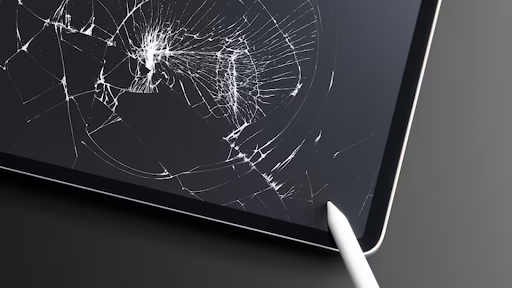
The iPad is one of the most popular and reliable tablets on the market today. Whether for work, school, or entertainment, it’s a device many people rely on daily. However, like any device, accidents happen. A cracked or damaged screen is one of the most common issues that iPad owners face. If you’re dealing with a cracked iPad screen, you’re likely wondering whether you should replace it yourself, take it to a professional, or simply buy a new one.
In this blog post, we’ll walk you through everything you need to know about iPad screen replacement—so you can make an informed decision and get your iPad back to its original condition as quickly as possible.
Why iPad Screens Get Damaged
The iPad screen is one of the most vulnerable parts of the device. Despite being made of high-quality materials, it remains susceptible to damage due to everyday use. Here are some of the most common reasons why an iPad screen might need replacement:
- Accidental Drops: The most frequent cause of cracked or shattered iPad screens is dropping the device, especially if it falls on a hard surface like concrete or tile.
- Pressure and Impact: Sitting on your iPad, placing heavy objects on top of it, or applying too much pressure can cause screen damage.
- Age and Wear: Over time, wear and tear from constant use, such as scratches, can weaken the screen and increase its susceptibility to breakage.
- Water Damage: While iPads are resistant to water, exposure to liquids, especially if they seep into the device, can cause screen issues.
Signs You Need to Replace Your iPad Screen
It’s easy to tell when your iPad screen needs replacing, especially if it’s visibly cracked. However, other signs might indicate the need for a replacement:
- Cracks or Shattered Glass: If you have noticeable cracks, chips, or the glass is shattered, it’s time for a screen replacement.
- Unresponsive Touchscreen: If the screen doesn’t respond to your touch, the digitizer may be damaged, and a replacement could fix the issue.
- Display Issues: Faint lines, discoloration, or dead spots on the screen could indicate problems with the LCD underneath the glass.
- Broken Display: If the display flickers or turns black, it might be more than just a screen issue—replacement is usually required.
DIY iPad Screen Replacement: Is It Worth It?
Many people consider replacing the iPad screen themselves to save money, but it’s important to understand the risks involved.
Pros of DIY iPad Screen Replacement:
- Cost Savings: Replacing the screen yourself can save on labor costs, which can be high at repair shops.
- Learning Experience: If you’re tech-savvy, replacing the screen might be a fun challenge and a way to learn more about your device.
Cons of DIY iPad Screen Replacement:
- Risk of Further Damage: iPads are complex devices, and replacing the screen requires precision. There’s a risk of damaging internal components or voiding your warranty if not done properly.
- Tools and Parts: To replace the screen, you’ll need specific tools and a quality replacement screen. These can be hard to source, and low-quality parts can result in a poorly functioning display.
- Time and Effort: The process can be time-consuming, especially if you don’t have experience. It may take several hours to complete, and if you make a mistake, you could make the situation worse.
For most people, the risks of DIY repairs outweigh the potential savings, especially when professional repairs offer guaranteed results.
Professional iPad Screen Replacement: Why It’s the Safer Option
Professional repair services are a reliable option for iPad screen replacement, offering several advantages over DIY repairs:
- Expertise and Experience
Certified technicians have the training and experience to perform the repair correctly, ensuring your iPad works as it should after the replacement. They’re familiar with all iPad models and know exactly what to do in the event of any complications. - High-Quality Parts
When you choose a professional service, you’ll be getting genuine Apple parts or high-quality third-party parts that are tested for durability and performance. This ensures your iPad functions just like new. - Warranty Protection
Many professional repair services offer warranties on their work, so if anything goes wrong with your iPad after the repair, you can get it fixed without additional charges. Additionally, authorized repair services don’t void your Apple warranty. - Fast and Convenient
Professional services often offer same-day repairs or quick turnaround times, so you won’t have to be without your iPad for long. They possess the right tools and expertise to complete the job quickly and effectively. - Peace of Mind
Choosing a professional repair gives you peace of mind knowing that your device is in capable hands. You won’t have to worry about making costly mistakes or further damaging your iPad.
Cost of iPad Screen Replacement
The cost of replacing an iPad screen can vary depending on several factors:
- iPad Model: Older iPads tend to be less expensive to repair, while newer models can be more costly due to the advanced technology involved.
- Service Provider: Authorized Apple repair centers and third-party repair shops may have different pricing structures. Apple’s pricing can sometimes be higher than third-party services, but authorized repair centers guarantee genuine parts and expertise.
- Warranty or Insurance: If your iPad is still under warranty or covered by AppleCare+ or another insurance plan, screen repairs may be partially or fully covered.
On average, you can expect to pay between $100 and $400 for an iPad screen replacement, depending on the model and the service provider.
How to Choose a Reliable iPad Screen Repair Service
When looking for a professional iPad screen repair service, consider these tips to ensure you get quality service:
- Check Reviews: Look for customer reviews and testimonials to gauge the reliability and quality of the service.
- Verify Certifications: Select a repair service that employs certified technicians who are knowledgeable about Apple products.
- Ask About Parts: Ensure that the service uses genuine parts or high-quality replacements that meet Apple’s standards.
- Compare Prices: Get quotes from multiple repair services to find the best deal. Make sure to factor in warranties and turnaround times.
Conclusion
An iPad with a cracked or damaged screen is a frustrating issue, but it doesn’t have to be a permanent one. Whether you decide to go the DIY route or opt for professional repairs, it’s important to weigh the pros and cons before making a decision. Professional iPad screen replacement offers expertise, quality parts, and peace of mind that DIY fixes can’t always provide.
By choosing a reliable repair service, you can get your iPad back to perfect working condition in no time. Keep in mind that investing in quality repairs is always a smart choice when it comes to maintaining the longevity and functionality of your iPad.